
Screenshot Import
Take a screenshot of your holdings. Greenline extracts the data.
Some brokerages make it difficult to export your data. No CSV download, no clean PDF statement, or a PDF that’s formatted in a way that’s hard to parse. Screenshot import solves this.
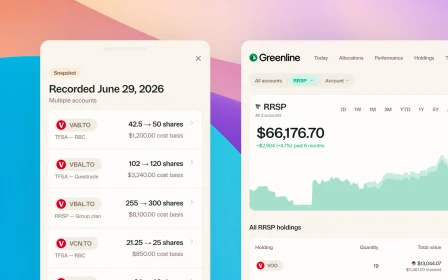
Take a screenshot of your holdings page. Upload it to Greenline. AI extracts the data and adds it to your portfolio.
How it works
- Open your brokerage’s holdings or portfolio page
- Take a screenshot (on your phone or computer)
- Upload the screenshot to Greenline
- Greenline uses AI to read the image and extract your holdings, quantities, and values
It’s the fastest way to get data into Greenline when your brokerage doesn’t offer a convenient export option.
What can Greenline extract from a screenshot?
From a typical holdings page screenshot, Greenline can identify:
- Ticker symbols and fund names
- Number of shares or units
- Market values
- Account type (when visible on screen)
The AI reads the screenshot the same way you would, pulling out the relevant data from the table or list on screen.
When should I use screenshot import?
Screenshot import is especially useful when:
- Your brokerage doesn’t offer CSV exports
- The PDF statements are hard to parse or incomplete
- You’re importing from a group RRSP or pension plan that only shows holdings through a web portal
- You want to quickly add a new account without waiting for a statement
For brokerages that do offer clean PDF or CSV exports, those methods may be more precise. But screenshot import works in situations where nothing else does.
What about mutual funds?
Statements bring in your stocks and ETFs. At this time, mutual funds are supported through manual tracking, so they are a separate step: you add each fund once, then set the balance from your statement, usually monthly or quarterly. There is a short guide on tracking mutual funds that walks through it.
We released it this way because people asked for it rather than waiting, and we are improving it as fast as we can.
What if the screenshot is hard to read?
For best results, make sure the screenshot clearly shows the holdings table with readable text. Greenline will flag anything it’s uncertain about so you can review and correct it before the data is added to your portfolio.
Can I use a photo from my phone?
Yes. Whether it’s a screenshot from your phone’s browser, a screenshot from your desktop, or a photo of a paper statement, Greenline can process it. As long as the text is legible, the AI can extract the data.
Related reading

Best way to track your portfolio in Canada

What to look for in a portfolio tracker

The multi-account problem
Best way to track your portfolio in Canada
We built a portfolio tracker, so we're biased. But here's an honest look at every approach: spreadsheets, brokerage tools, bank-linked apps, and more.
What to look for in a portfolio tracker
The multi-account problem
See your full financial picture in one view.
See your full portfolioFree during Beta. Early Members will be offered better rates than new users when we launch paid plans.